Sundog Song Studio: A MIDI Laboratory for Chords and Melodies
There are plenty of DAWs, plugins, and instruments that help you make sounds. But what about the bit that comes before - figuring out which notes to play in the first place? That's the gap Sundog Song Studio fills. Made by a small German developer called FeelYourSound, Sundog is a standalone MIDI composition tool that sits alongside your DAW and helps you explore chords, scales, and melodies without getting lost in theory books.
It's not a synthesizer and it's not a plugin. It's more like a musical sketchpad where you pick a scale, try different chord progressions, layer melodies on top, and then send the results to your DAW as standard MIDI. The idea is simple: remove the friction between having a musical idea and actually hearing it.
How It Works
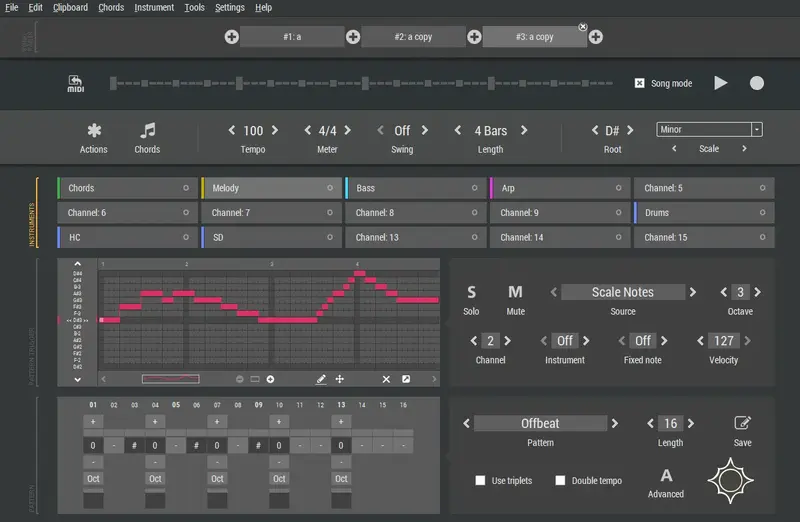
The workflow follows a logical path. You start by choosing a scale and root note - over 300 scales are available, from common major and minor to more exotic modes. If you already have some notes in mind but don't know the scale, the Scale Finder tool lets you input notes and discover which scales match.
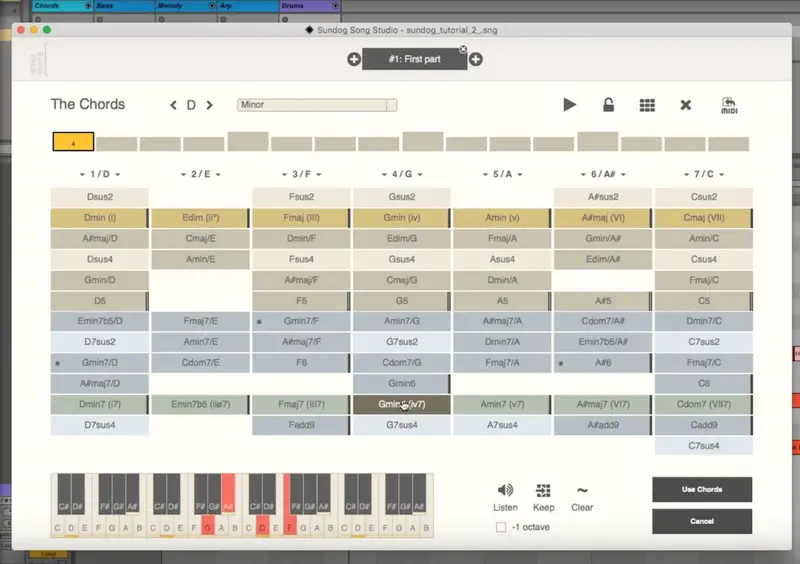
From there, you move to the chords view. Sundog includes more than 500 built-in chord progressions, and a progression search engine helps you find ones that fit the mood you're after. You can click on any chord to hear it instantly, adjust voicings, and build your own collections. If you've already started something in your DAW, you can even import MIDI chord progressions and Sundog will detect the scale automatically.
Once you're happy with the harmonic foundation, you create melodies in the main editor. Here's where things get interesting: your input - whether from a mouse, computer keyboard, or MIDI controller - can be mapped to either scale notes or chord notes. This means your melodies will always sound harmonically correct, even if you're just noodling around. When you change a chord in your progression, the associated melodies adjust automatically.
Patterns and the Actions Menu
The Pattern Finder contains over 200 factory rhythms you can search through, making it easy to find starting points for arpeggios, basslines, or melodic patterns. Version 4.0 brought the Actions Menu, which takes this further - you can create basic patterns with a single click and then reshape them using transformer actions. Drag-and-drop editing with copy support and right-click transformer options give you quick ways to rework sequences without starting over.
Step sequencer functionality rounds things out. You can build patterns step by step, and the software handles the musical logic behind the scenes. Song parts let you test different variations, bridges, and progressions as separate sections before committing to a structure.
What Version 4.0 Added
The latest major update brought several welcome changes. Time signature support expanded beyond the previous 4/4 limitation to include 2/4, 3/4, 5/4, 6/4, and 7/4 - a significant addition for anyone working outside standard meter.
New source modes give you more control over how notes are generated. "Chord Notes (dense)" stacks notes across octaves, while "Chord Notes (shift)" compresses wide spreads into tighter clusters. Various "Scale + Chords" combinations let you blend both approaches with automatic duplicate removal.
The interface received a visual refresh with updated themes, and new chord features include flow settings for automatic inversions and advanced chord effects like displacing the fourth note up an octave. Bass settings now let you define automatic dedicated bass notes when selecting chords.
Who Is It For?
Sundog sits in an interesting space. For beginners, it's genuinely educational - you learn about scales, chord relationships, and harmonic structure just by using it. Beat magazine gave it 9.5 out of 10, calling it "a fantastic learning tool that will increase workflow".
For more experienced producers, it works as a rapid prototyping tool. When you need to sketch out a chord progression or find a melody that fits, Sundog lets you try dozens of options in minutes rather than hours. The built-in soundset of over 100 instruments means you can preview everything without leaving the application, and when you're ready, drag and drop your MIDI into your DAW.
The software runs on Windows 7+ and macOS 13+ as a standalone application. It connects to any DAW through a virtual MIDI cable, or you can simply export standard MIDI files. A free demo is available from the FeelYourSound website if you want to try before you commit.
More News
Notes